
blog· Agentic Architecture
Change your Grok Bot avatar — default face, upload, or a GIF that moves
Each Bot gets its own face. The default is a colored geometric shape with two slit eyes. You can keep that, generate a new one, or upload a still or a GIF. The face is per-Bot, not account-wide. Plugins are shared. Avatars are not.
Live cluster: Create Customized Grok Bot Employees. Public walkthroughs: Dennis Yu’s sidebar, Billy Howell’s Edit Profile shot. Official: settings and notifications, create and manage Bots.

Chief Bot on this account. A GIF is a valid avatar file. The face moves.
Open Agent settings, not Grok Bot settings
Grok Bot settings (Cmd/Ctrl+,, or the account menu) is app-wide: appearance, plugins, execution on the local computer. It does not hold the face.
The face lives on one Bot.
- Open the Bot.
- Click its name in the chat header, or press
Cmd+Shift+I(View conversation details). - Open the gear. That is Agent settings.
- Or: Bot actions → Edit Profile.
xAI lists the fields on that page: name, title, description, Avatar, and the Notifications preference (settings and notifications). Create flow is the same editor after New → Create new agent (create and manage Bots).
| Surface | What it changes | Face? |
|---|---|---|
Grok Bot settings (Cmd/Ctrl+,) |
Theme, plugins, local execution, Auto-review | No |
| Agent settings / Edit Profile | Name, title, description, avatar, notifications | Yes |
| Duplicate | Copies profile, settings, skills, routines, and avatar. Not the chat. | Copies the face |
Do not look for a gear in macOS Preferences. There isn’t one.
Three ways to set the face
The editor photographed in public has three tabs: Bot, Generate, Upload, plus Reset. That shot is Billy Howell’s LinkedIn post (13 Aug 2026). Official docs name the Avatar field. They do not name the tabs. Cite the photo for the tabs.
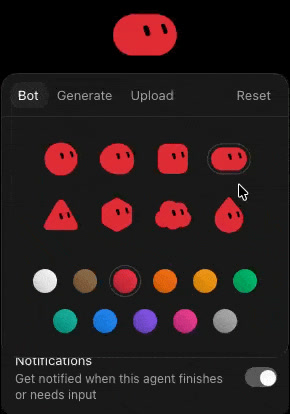
Bot tab. Eight shapes. Color swatches. Notifications sit on the same page.
| Tab | What you get | When |
|---|---|---|
| Bot | Eight default shapes (circle, oval, rounded square, pill, triangle, hexagon, cloud, teardrop) and a color row | Fastest. Enough to tell one row from another. |
| Generate | A generated face | When you want a portrait and do not have a file. |
| Upload | Your file. Still or a GIF. | When the desk already has art. |
| Reset | Back to a default | When the custom face was a mistake. |
Shapes on the Bot tab, from that photo: circle, oval, rounded square, pill, triangle, hexagon, cloud, teardrop. Colors sit under the grid. Do not write “88 combos” into a filing unless you counted them yourself on the current build.
Default faces already move. Billy called the animations delightful. Working-state motion on a row (the moving dots) is status, not a special three-dots face. Dennis Yu separated those layers. Official docs list Needs attention, Unread activity, and working or typing as attention states, not as a meaning for the shape.
A GIF is how you animate a custom face. Official docs do not list file types. This account’s Chief Bot uses a 16-bit wink GIF as the avatar. That is the proof, not a vendor spec. If Upload rejects a file, try a still PNG or JPEG. Do not invent a size limit.
What the sidebar shapes are (and are not)
They are faces. Not a department code.
Dennis Yu: triangle is not strategy. Hexagon is not quality. Pink is not an error. Orange is not urgent. Red on the shape is still just the face. Status is a different layer.
His live sidebar mixes both kinds: default geometric faces next to photographic headshots. That is the point of Upload.
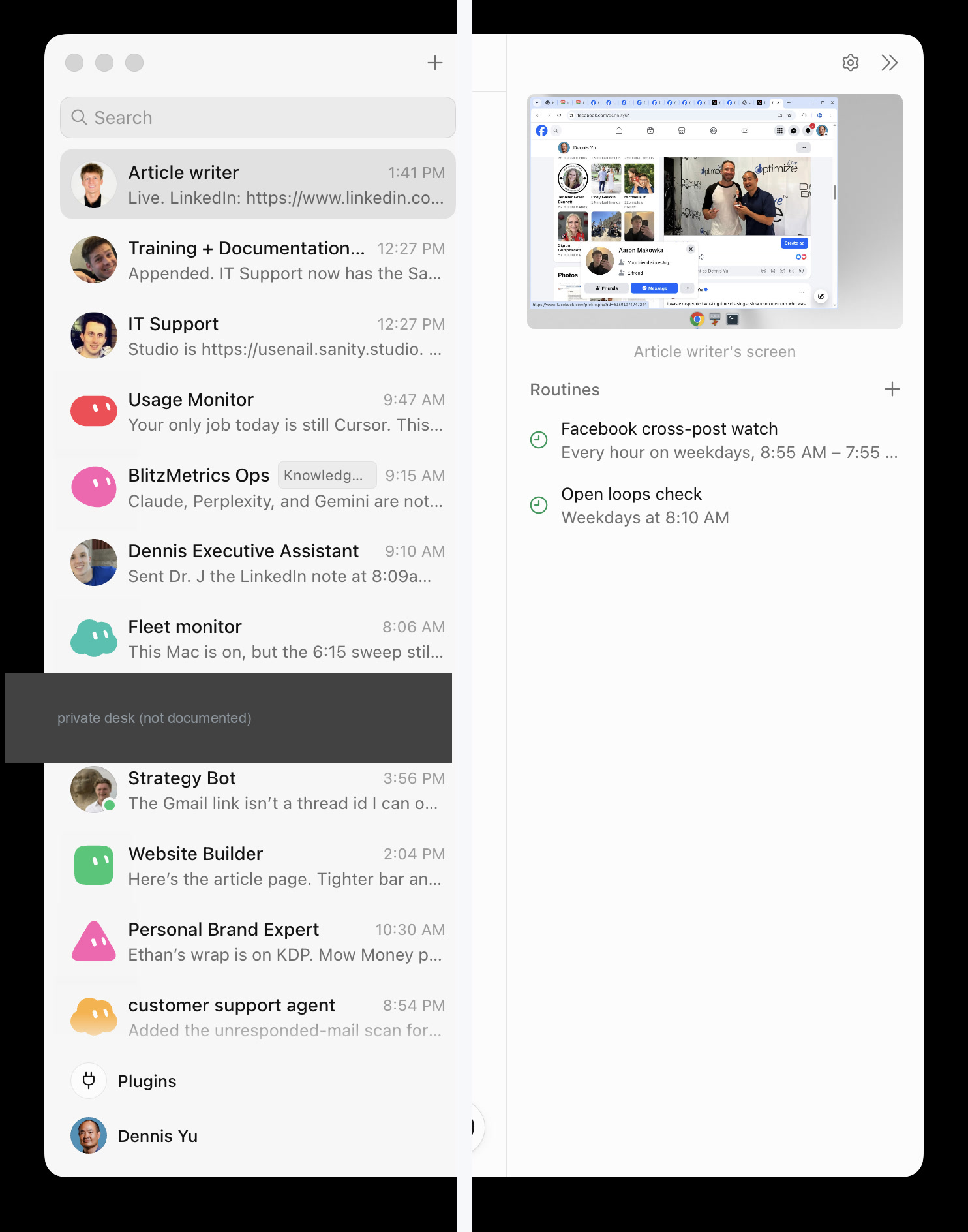
Photographed from his Mac, 18 Aug 2026. Private desk covered. Source: blitzmetrics.com/skills-and-routines.
A public product shot of the same default set (named desks, colored shapes, no custom art) is on this Medium review:
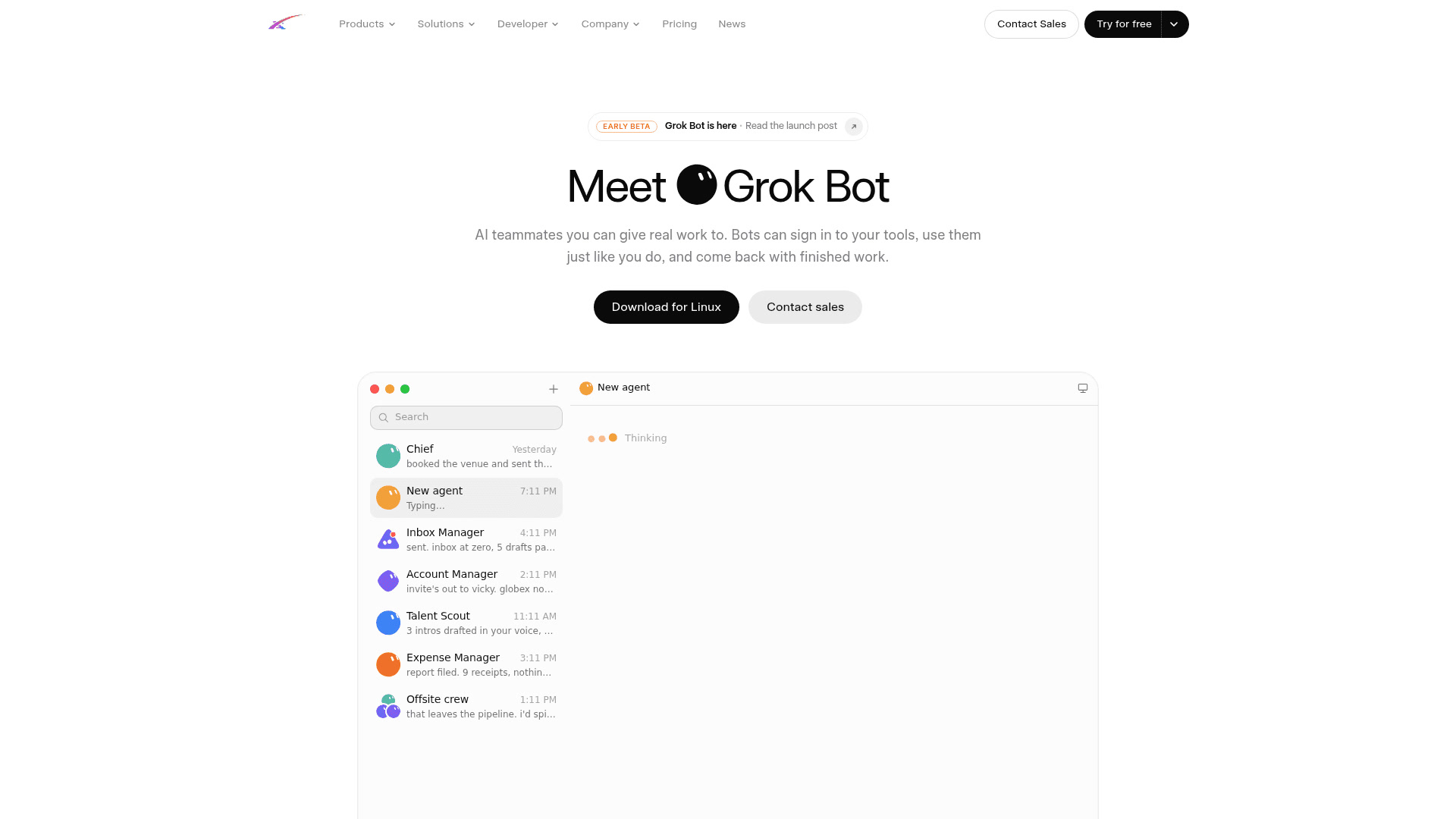
Default roster. Credit on the page is xAI / product screenshots.
What actually ran with a roster of faces
00210 — @Voxyz_ai. Three named employees: Refund Hunter, Digital Cleaner, Meeting Double. Approval before delete, unsubscribe, or send. Three notification types. Evidence is the X thread.
The screenshot on that thread is the default geometric set: hexagon, square, triangle. Named desks. Not custom pixel art. That is a finished job, not an avatar tutorial. The face change is the same editor as above.
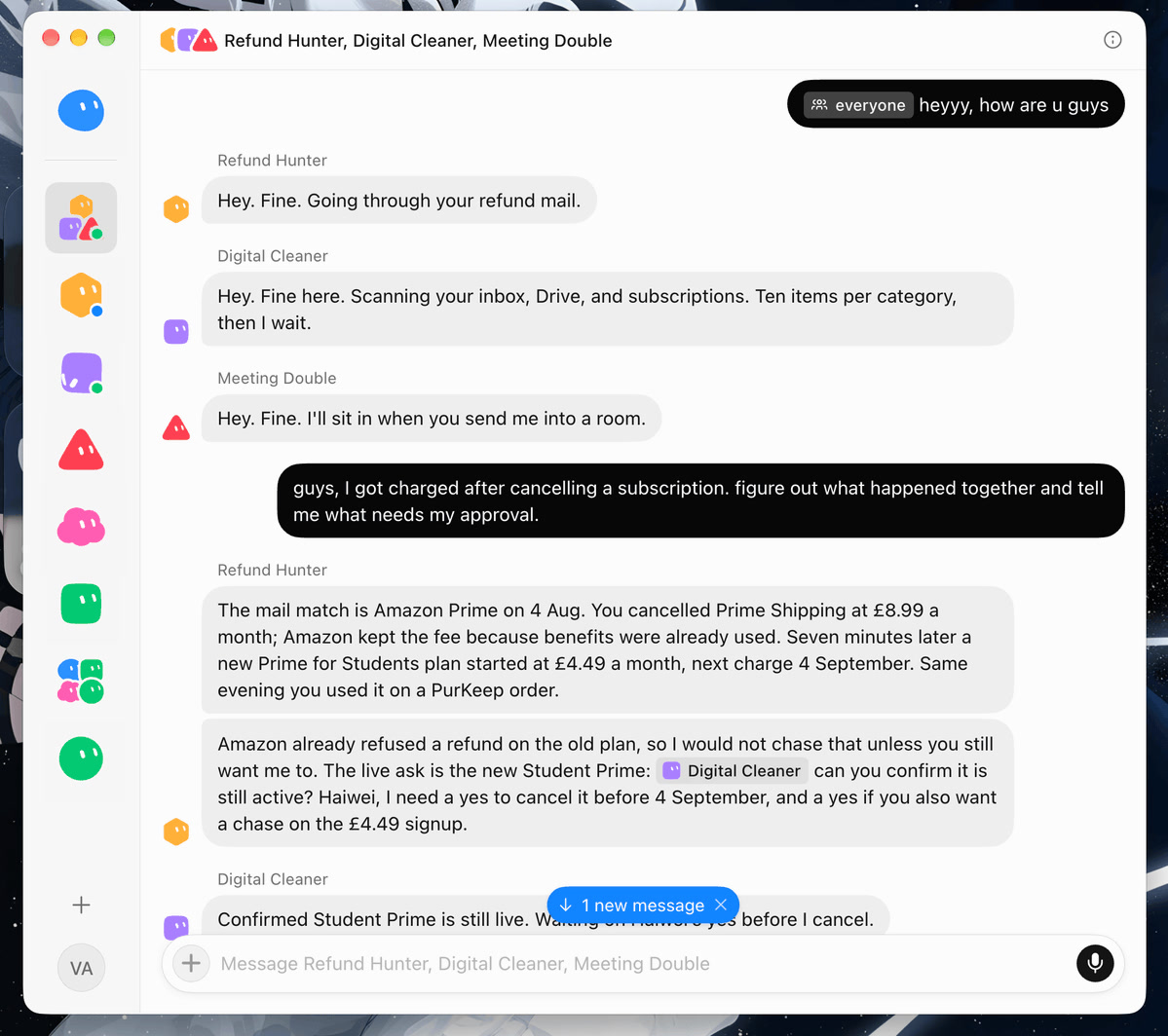
Public evidence on 00210. Default faces. The job is the roster, not the art.
| Job | Steward | Faces in the evidence | What you may file |
|---|---|---|---|
| Customized employees | @Voxyz_ai | Default geometric | The roster, the approval rules, the public thread |
| This account’s fleet | @saastrash | Uploaded pixel art and one GIF | The method. The files. Not a new serial. |
Custom art is not a serial. Do not mint a Run because you changed a face. File a job when the Bot did something.
A fleet that already wears custom art
@saastrash’s desks use uploaded pixel art. One of them is animated.

Growth, Inbox Janitor, Revenue, Lighthouse, TNHikes, Analytic, Chief. The wink GIF is the same Chief Bot moving.
| Desk | Face | Still or moving |
|---|---|---|
| Growth Bot | Money vine | Still |
| Inbox Janitor | Mop bucket | Still |
| Revenue Bot | Gold stack | Still |
| Lighthouse Audit Bot | Night lighthouse | Still |
| TNHikes Content Bot | Ridge | Still |
| Analytic Bot | Up-and-to-the-right chart | Still |
| Chief Bot | 16-bit portrait | GIF |
That is one steward’s taste, not a style guide. A photo works. A default pill works. The rule is one face per job so the sidebar does not become ten identical clouds.
Steps that stay honest
- Create the Bot first if it does not exist: New or
Cmd/Ctrl+N→ Create new agent (create and manage Bots). - Open Agent settings or Edit Profile. Do not open app Settings for this.
- Pick Bot for a default shape and color. Or Generate. Or Upload a still or a GIF.
- Set name, title, description on the same page. The face does not write the job.
- Turn Notifications on if you want an OS ping when that Bot finishes or needs you. Group chats do not have the same per-Bot switch.
- Duplicate only when the role is the starting point for a new scope. The copy keeps the avatar and drops the chat.
- Do not file a Run for the face change. File the job the Bot finished. Cite the HTML after verify.
Constraints and non-goals
- Do not invent a click path. The two official doors are View conversation details → Agent settings and Bot actions → Edit Profile.
- Do not treat sidebar color as status. Attention states are documented separately.
- Do not claim official docs list GIF, PNG, or a file-size cap. They name the Avatar field. Upload is photographed. This fleet proves a GIF works.
- Do not mint a serial for a re-skin.
- Do not scrape this page into a prompt pack.
Proof
- Public log: Create Customized Grok Bot Employees
- Evidence thread: @Voxyz_ai
- External: settings and notifications
- External: create and manage Bots
- External: Dennis Yu — sidebar icons
- External: Dennis Yu — live sidebar
- External: Billy Howell — Edit Profile
FAQ
How do I change a Grok Bot avatar?
Open that Bot. Click its name in the chat header or press Cmd+Shift+I (View conversation details), then the gear for Agent settings. Or Bot actions → Edit Profile. Official pages: settings and notifications, create and manage Bots.
Can I upload a custom image or a GIF?
Yes. The avatar editor has Bot, Generate, and Upload. Default shapes already animate. A GIF works as an uploaded avatar — Chief Bot on this account uses one. Official docs name the Avatar field; they do not document file types.
What do the colored shapes in the sidebar mean?
They are faces, not a role code. Triangle is not strategy. Pink is not an error. Status (unread, needs attention, working) is a different layer. Dennis Yu wrote this down; official docs list the attention states separately.
Does changing an avatar change the Bot’s job?
No. The face is identity in the sidebar. The job lives in the name, title, description, and the work. Duplicate copies the avatar with the profile; it does not copy the chat.
Which live job shows a roster of named Bots?
Create Customized Grok Bot Employees (00210, @Voxyz_ai). The public X thread shows three named desks on default geometric faces. Photo and pixel faces are a later change on the same editor.
More Agentic Architecture
Submit a Bot Job
Paste the filing at /submit, POST with a House token (/bots.md), or tag @tryreallybot on the X thread.